- $140,000,000 Down a Subway Hole
- Using A Sandisk MP3 Player On A Linux Desktop
- PCLinuxOS Magazine Extra
- Linux Mobile Foundation – новое детище крупных игроков мобильного рынка
- openSUSE 10.2 Live DVD available
The Road to KDE 4: Job Progress Reimagined
Published By: Vichar Bhatt on January 24, 2007 - 6:08am
Original Blog Entry Located Here
Filed In: Networking
Original Blog Entry Located Here
Filed In: Networking
Have you ever had your taskbar filled with 10 applications all doing something that involved waiting for a task to finish? Document Printing Progress, a K3b CD burning dialogue, Audio Encoding via KAudioCreator, File Transfers in Konqueror, Kopete, KTorrent, checking email in KMail… The new Jobs support in KDE 4 will unify the display of progress for these tasks, making it easy to see and manage what is happening on your system. Read on for details.
Picture it as a cross between the Firefox download manager and the KDE printer queue, except that there is no real restriction on what type of jobs can be monitored. The way it works is that each KDE 4 app that has a progress dialog adds a flag for something called an Observer. Then, a separate application can observe any running Jobs, displaying progress and even adding certain actions (like “Cancel Download”) which can be submitted back to the application that actually has the progress dialog. So the applications like K3b, which already have very good progress reporting, will not lose their existing dialogs, but rather additionally permit this new applet to observe its progress so that all the progress bars can be pulled into a convenient place.
What started as a mocked up KDE 4 Improvement via KDE-Look.org has turned into a full-fledged KDE 4 integration project, thanks to Rafael Fernandez Lopez. And there’s been a lot of progress to the point where applications are already being adapted to the new infrastructure. Last Tuesday’s “Binary Incompatible Changes” day saw much of the changes officially committed to the KDE 4 repository.
Below is the original mock up, done by KDE user and KDE-look.org contributor kiras, used with permission. Click to see the full-sized mockup.
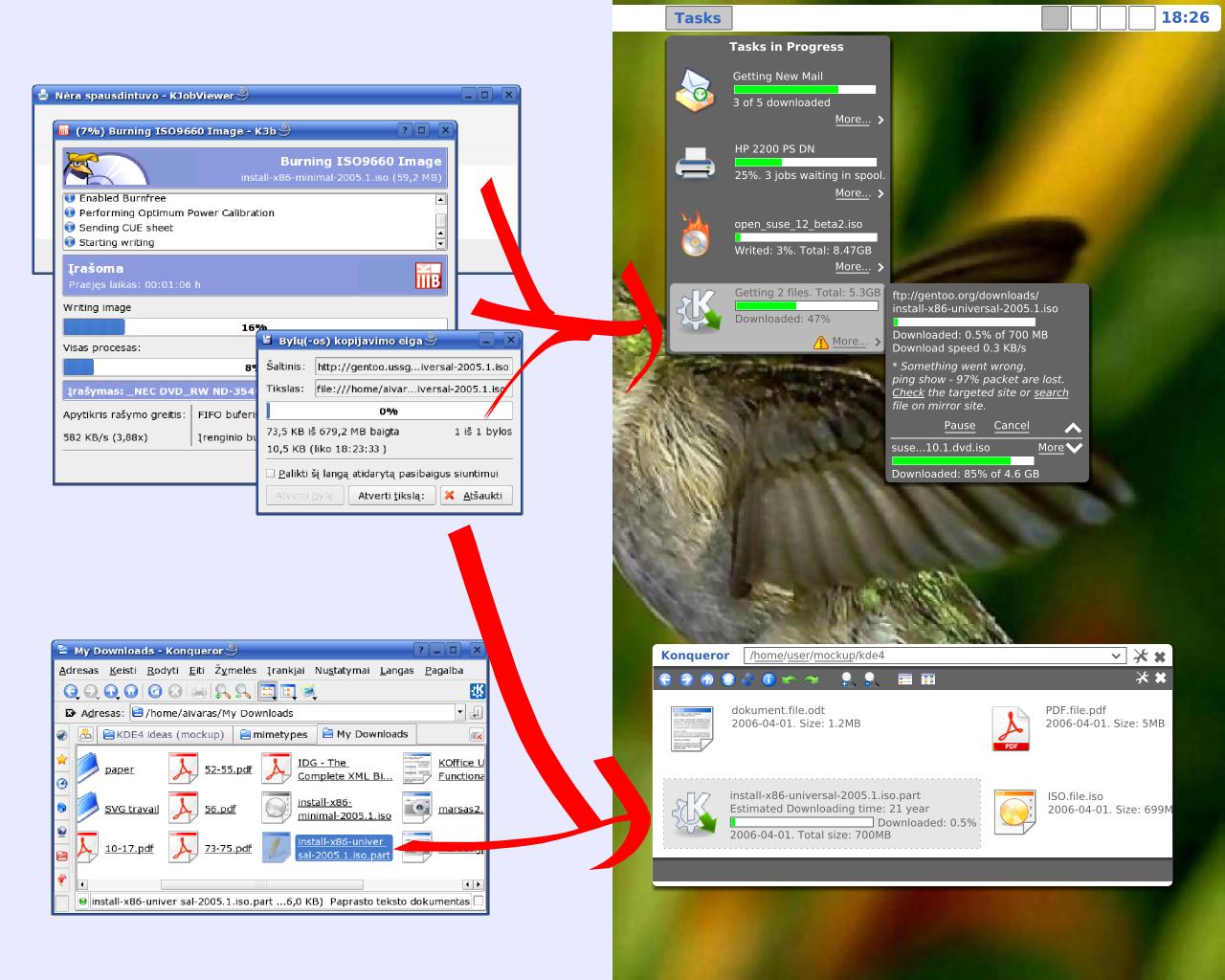
Please keep in mind that the above is a mockup, and does not necessarily reflect the ultimate look-and-feel goals of KDE 4, Plasma or Konqueror.
Currently, it is being prototyped as a standard system tray applet (similar to the printer queue in KDE 3.5.5) which would allow interoperability with GNOME’s tray implementation as well. However, at this point only KDE applications can be observed, so monitoring download progress from Firefox for instance, is not currently supported. That is not to say it cannot be made to happen in the future since progress is observed using the standard D-Bus interprocess communication architecture. There are intentions to collaborate with the GNOME project’s Mathusalem team, a project of similar scope as this one.
Here is a screenshot of the current appearance of the monitoring application as it would appear when clicking on the tray applet. As you can see, it’s already looking very useful.

As you can see, the Kopete buttons are mostly just placeholders at the moment, and only exist for testing purposes. However, when you click on one of those buttons, it actually sends a signal back to Kopete, and Kopete itself pops up that smaller dialog you see.
The Konqueror download progress bars you see being monitored represent an actual file download in progress. They continue even after Konqueror is closed. Useful action buttons like “Abort Download” are in the works.
If you’d like to get involved in KDE 4 development, adding support for the new KJobs progress monitoring is a fairly easy entry point to KDE programming. It takes only a few lines of code to adapt an application to display progress, and a few more lines to make the action buttons useful.
This new progress monitoring technology will be able to be integrated into Konqueror (like in the mockup), desktop applets, and anything else that uses D-Bus. I can even imagine a small web-app that lets you monitor progress remotely…
Rafael’s goal after the initial implementation is completed is to add persistence, such that when a job is complete, it would optionally stay listed until closed by the user. He is also looking for feedback on this tool and its implementation for future improvements.
Look forward to more feature articles showcasing more great technologies for KDE 4.
A quick note on methodology: I make sure to use the KDE defaults for all of my screenshots, even if it’s ugly, since then you can get a better sense of progress as KDE 4 evolves and grows from week to week. As a rule, all of the features I’ve demonstrated so far are publicly available in SVN, and anyone can reproduce my results. In today’s article, I had to uncomment a single line of code to enable this in-development feature, which is an exception to my normal rules. Additionally, the Kopete progress support is not yet in the official KDE SVN repository, but Rafael uses it to test features.
- kde.news
Bookmark/Search this post with:
| | | | | | | |
Sponsored White Paper
Recent Blog Entries
Related Blog Entries
Newsletter
Get these headlines/links in a daily e-mail newsletter.
Sponsored Links
User login
- Create new account
- Request new password
Navigation
Browse archives
| Su | Mo | Tu | We | Th | Fr | Sa |
|---|---|---|---|---|---|---|
| 1 | 2 | 3 | 4 | 5 | 6 | |
| 7 | 8 | 9 | 10 | 11 | 12 | 13 |
| 14 | 15 | 16 | 17 | 18 | 19 | 20 |
| 21 | 22 | 23 | 24 | 25 | 26 | 27 |
| 28 | 29 | 30 | 31 |